Stop Buying $800 'AI Study Tablets' That Gather Dust: How a 12-Year-Old Built an Interactive Physics Circuit Simulator in 60 Minutes
In almost every home I visit for youth AI creation coaching, there is an expensive 700 to1,000 commercial “AI Study Tablet” sitting in a drawer gathering dust.
When I ask parents what happened, the story is always identical:
“She used it for three days when it was new. Then she realized the so-called ‘AI tutor’ was just a digital worksheet machine forcing her to watch pre-recorded lectures and drill multiple-choice quizzes. After seven hours of worksheets at school, the last thing she wanted was another screen lecturing her.”
Why do expensive commercial study tablets fail to hold a teenager’s curiosity for even a month?
Because commercial study tablets treat 10-to-16-year-olds as passive quiz-taking consumers—whereas real AI creation turns the child into the Chief Engineer building their own interactive science lab.
In Issue #04 of our Kids AI Creation Tutor column, I’ll walk through a real 60-minute session from yesterday afternoon with a 12-year-old 7th-grade girl who hadn’t even started 8th-grade electricity yet—and show how she built a working, interactive Series/Parallel Circuit & Short-Circuit Fuse Lab from scratch.

1. Why a 60-Minute Creation Session Beats an $800 Locked Tablet
Between ages 10 and 16 (grades 4 through 11), children enter Piaget’s formal operational stage. Watching ten passive video lectures cannot compete with building one working simulation:
| Dimension | $800 Locked Commercial “Study Tablet” | 60-Minute Hands-On AI Creation on a Laptop | Cognitive Impact on a 10–16yo |
|---|---|---|---|
| Student’s Role | Passive Consumer: Taps A/B/C/D on pre-made worksheets | System Designer: Defines physical laws, UI controls, and state transitions | Shifts mindset from “dreading tests” to “designing experiments” |
| Learning Abstract Physics | Memorizing rote rules (“series splits voltage, parallel splits current”) | Coding Ohm’s Law (I = U/R) into moving electrons & glowing bulbs | Turns abstract algebra into visible physical intuition |
| Response to Mistakes | Red “X” mark and penalty drills | Intentionally triggering a short-circuit spark & blowing a virtual fuse | Transforms fear of failure into scientific curiosity |
| Long-Term Asset | Hardware becomes obsolete in 2 years | Builds a personal portfolio of 50+ runnable web simulations & tools | Masters problem definition and verification for life |
2. The 60-Minute Walkthrough: Building the Virtual Circuit Lab
Step 1 (0–15 Min): Translating Water Pipes into a 4-Rule Product Spec
Before touching the keyboard, we used a water-pump analogy on paper to define four clear simulation states:
- Components: A variable voltage battery (3 ext{V}–12 ext{V} slider), two 6\Omega lightbulbs, three knife switches, plus live digital Ammeter (A) and Voltmeter (V) readouts;
- Series Mode: Current flows through both bulbs sequentially (R_{ ext{total}} = 12\Omega), glowing dimly; opening any switch stops the entire loop;
- Parallel Mode: Each branch gets full voltage, glowing brightly and independently;
- Short-Circuit Mode: Closing a zero-resistance bypass wire routes all electron particles around the bulb—or triggers a red overheating alert if the battery is shorted directly!
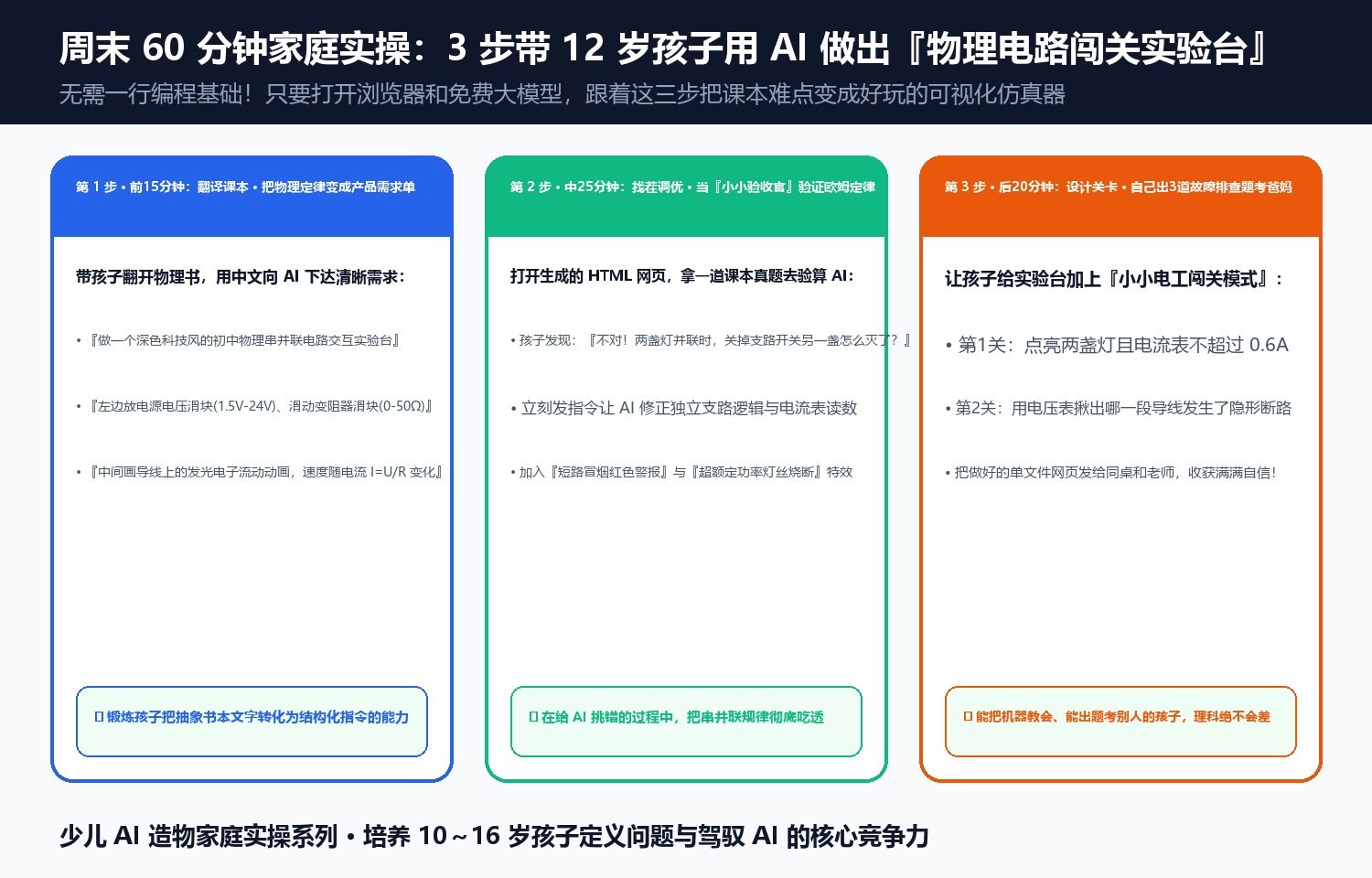
Step 2 (15–50 Min): Catching Two Scientific Bugs Like a Real Engineer
When the first HTML5 Canvas version ran, the 12-year-old tested it and caught two flaws on her own:
- Bug #1: “When I dragged the battery from 3V to 12V, the ammeter number quadrupled, but the blue electron dots didn’t speed up!” She instructed the AI to bind particle velocity directly to current I = U/R and scale bulb glow radius with power P = I^2R.
- Bug #2: “In a real house, a short circuit trips the breaker!” She added a virtual glass fuse that melts after 2 seconds whenever current exceeds 3.0 ext{A}, requiring the user to fix the wiring and click “Replace Fuse.”
By minute 60, she called her dad over to quiz him on partial short circuits using the simulator she had built with her own hands.
Zhitong’s Youth AI Creation Tutor Column (Ages 10–16) Explore our full curriculum and methodology at
doaipm.com/zh/tutor/
Discussion